In questa guida, esploro le potenzialità del motore di inferenza di Unity: Unity Sentis per creare un’applicazione di Computer Vision capace di monitorare la postura in tempo reale e segnalarlo all’utente.
Introduzione
L’obiettivo del progetto è semplice: utilizzare la fotocamera dello smartphone per tracciare la postura e attivare un avviso sonoro quando l’utente si incurva troppo.
L’idea è quella di utilizzare un vecchio smartphone che per effettuare il tracciamento e l’analisi della postura.
Per questo progetto ho usato Unity Sentis, un motore di inferenza che permette di far girare reti neurali direttamente sul dispositivo.
Lo stack tecnologico si basa su:
- Modello AI: MoveNet SinglePose Lightning (Google), in locale sullo smartphone.
- Input: Immagini RGB 192x192 pixel.
- Output: 17 Keypoints (punti chiave) del corpo umano.
Sviluppare per Android, specialmente su dispositivi datati come quello che ho utilizzato per questo progetto: Samsung S9 (Exynos), ha fatto emergere criticità hardware inaspettate che Unity spesso non gestisce automaticamente.
Funzionalità e sviluppo
L’applicazione non si limita a tracciare punti; interpreta i dati per renderli utili all’utente finale.
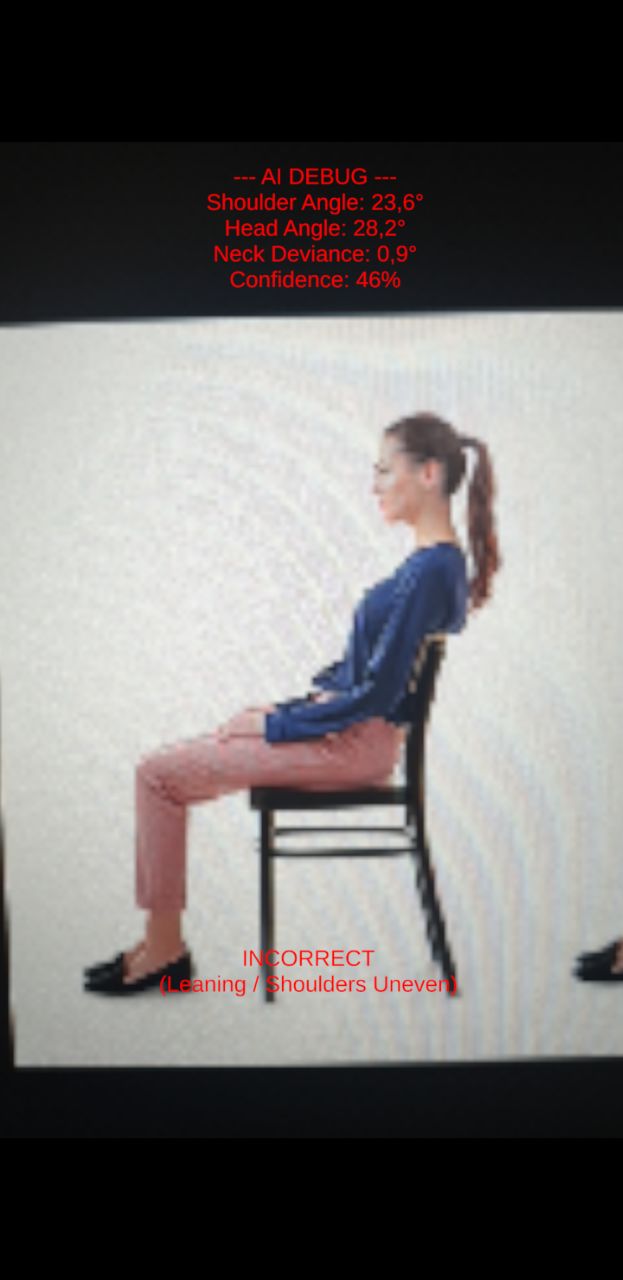
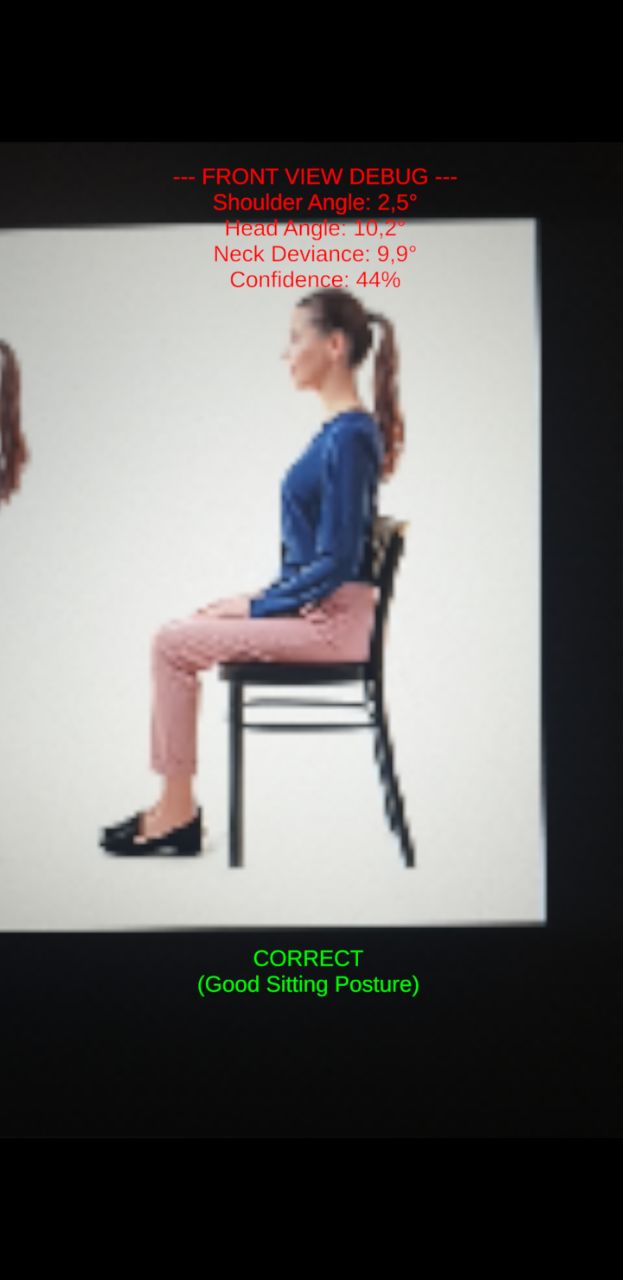
Nella versione iniziale, l’app forniva dati di debug e valutava se la postura fosse corretta. Tuttavia, questo meccanismo portava spesso a falsi positivi, attivando avvisi anche quando la postura era corretta.
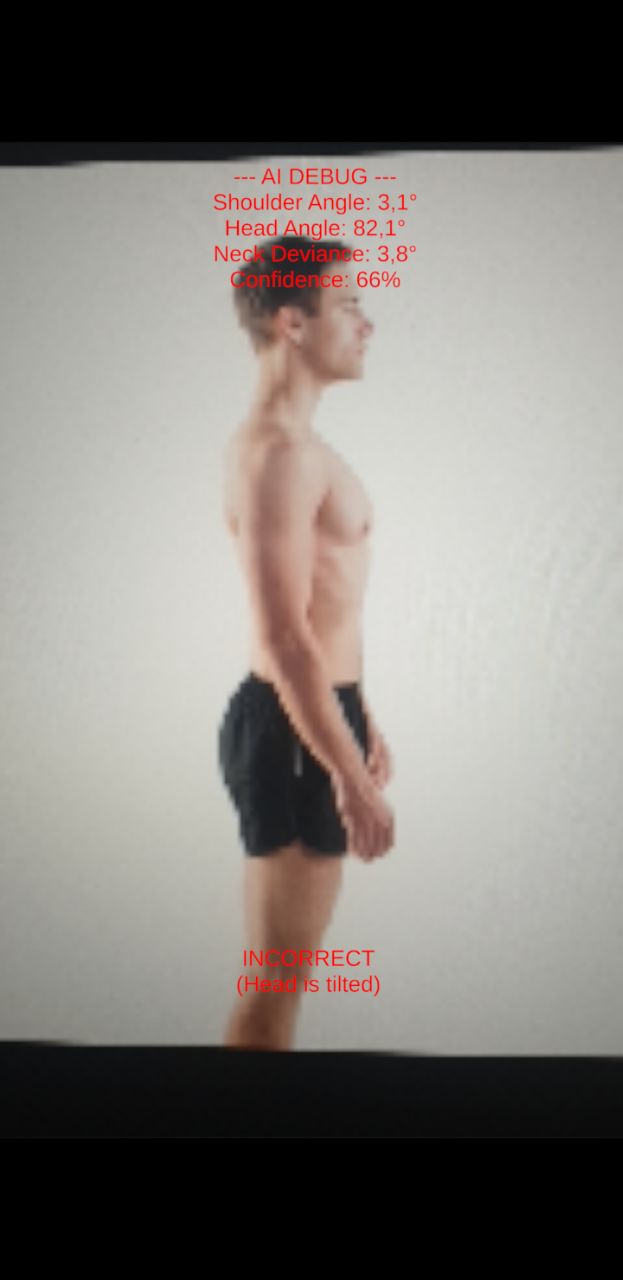
Per risolvere il problema, è stato aggiunto un pulsante di calibrazione.
Calibrazione Personalizzata
Poiché ogni corpo è diverso, e il modello stesso è basato su delle rilevazioni ideali, ho aggiunto un sistema di calibrazione. L’utente preme un pulsante mentre è seduto nella sua posizione “corretta”; l’app salva quegli angoli come “Punto Zero” di riferimento, adattandosi a utenti che potrebbero, ad esempio, avere naturalmente una spalla più alta dell’altra, o semplicemente avere una posizione corretta diversa da quella attesa.
Eliminare la rumorosità con l’Exponential Smoothing
I dati grezzi dell’IA sono intrinsecamente rumorosi.
In una prima versione dell’applicazione quando il modello MoveNet rilevava i punti del corpo (come le spalle o le orecchie), i dati che restituiva non ero mai perfettamente immobili.
Infatti anche restando fermo davanti alla fotocamera, le coordinate x e y di un punto possono “saltare” di 5–10 pixel tra un frame e l’altro a causa di rumore digitale, variazioni di luce o incertezza del modello.
Senza un filtro, questo farebbe oscillare violentemente gli angoli calcolati, attivando falsi allarmi sonori anche quando la tua postura è corretta.
Per risolvere il problema, ho implementato un Filtro di Smoothing Esponenziale, con l’aiuto di Gemini.
Invece di far saltare istantaneamente un punto dalla vecchia posizione alla nuova, il sistema lo sposta solo di una piccola percentuale, cioè invece di fidarsi direttamente del dato grezzo dell’IA Xt, l’app calcola una posizione smussata St combinandola con la posizione del frame precedente St−1 utilizzando un fattore di smoothing α (es. 0,15):
St=(1−α)St−1+αXt
Questo agisce come un ammortizzatore digitale, restituendo angoli stabili che si aggiornano solo durante i movimenti fisici reali.
Per esempio:
Immagina che il tuo orecchio sia alle coordinate (100, 100). Improvvisamente, l’IA legge un dato rumoroso che dice (110, 110).
- Senza filtro: Il punto salta a 110. L’angolo cambia bruscamente. L’applicazione potrebbe produrre falsi positivi.
- Con l’Exponential Smoothing (α=0.15) :Il sistema calcola la nuova posizione prendendo l'85% della vecchia (85) e il 15% della nuova (16,5). Il risultato è 101,5.
- L’oscillazione di 10 pixel è stata ridotta a un movimento fluido di soli 1,5 pixel.
Visualizzazione UI dello Scheletro (Senza LineRenderer)
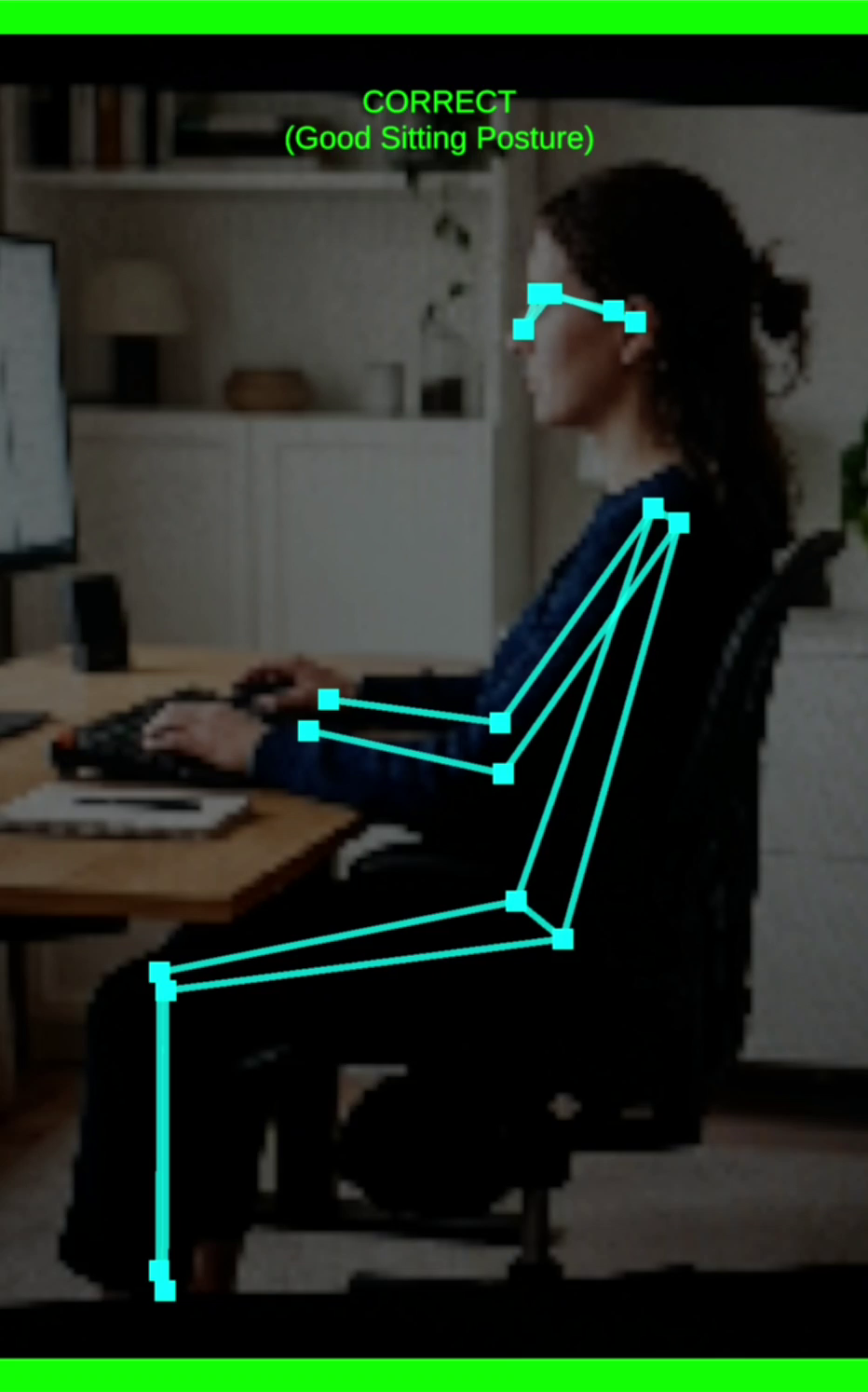
Per avere anche un feedback visivo nella fase di debug, dovevo disegnare lo scheletro tracciato sopra il flusso della telecamera. L’approccio standard in Unity è l’uso di un LineRenderer. Tuttavia, il LineRenderer opera nello spazio 3D, il che causa enormi problemi di ordinamento della profondità (depth-sorting) e di scalabilità quando sovrapposto a un Canvas UI in 2D Screen Space.
Invece, ho sviluppato un algoritmo personalizzato utilizzando componenti Image standard e RectTransform. Impostando il pivot di un’immagine sul bordo (0, 0.5), possiamo allungarla e ruotarla matematicamente per collegare due articolazioni qualsiasi:
Lunghezza: Si calcola la magnitudo del vettore tra le due articolazioni per impostare il sizeDelta.x.
Rotazione: Si usa Mathf.Atan2 per calcolare l’angolo tra le articolazioni e lo si applica tramite Quaternion.Euler.
La Matematica della Postura
Per determinare se un utente è curvo, l’app utilizza la trigonometria standard per calcolare la deviazione di specifiche parti del corpo da un asse perfettamente verticale o orizzontale.
Per garantire che i calcoli funzionino perfettamente indipendentemente dal fatto che l’utente utilizzi la fotocamera frontale (specchiata) o quella posteriore (non specchiata), calcoliamo l’angolo utilizzando la differenza assoluta tra le coordinate X e Y.
Ad esempio, per calcolare l’Angolo del Collo in Avanti (Tech Neck) da un profilo laterale, individuiamo l’orecchio e la spalla visibili. L’angolo θ rispetto a una colonna vertebrale perfettamente verticale è calcolato come:
θ=arctan(∣Orecchioy−Spallay∣∣Orecchiox−Spallax∣)×π180
Se θ supera il valore base calibrato dall’utente di una specifica soglia (es. 25∘), l’app segnala la postura come errata.
Visualizzazione UI dello Scheletro
Per il feedback visivo, invece di utilizzare il pesante 3D LineRenderer, ho sviluppato un algoritmo che utilizza RectTransform 2D. Ciò consente di disegnare lo scheletro luminoso direttamente sopra la UI, garantendo prestazioni elevate anche su telefoni di fascia media.
Progetto
Model
Per il tracciamento dello scheletro, la scelta è ricaduta su MoveNet SinglePose Lightning di Google. A differenza della versione “Thunder” (più precisa ma computazionalmente pesantissima), la versione Lightning è progettata per la velocità.
Il modello è disponibile al seguente link https://huggingface.co/Xenova/movenet-singlepose-lightning/tree/main/onnx.
Scaricate il modello base non quantizzato.
- Input: Immagini microscopiche, matrici RGB da 192x192 pixel.
- Efficienza: Questa bassa risoluzione abbatte i FLOPS (operazioni in virgola mobile al secondo), permettendo al processore di elaborare il frame in frazioni di secondo.
- Output: Un array di coordinate per 17 punti chiave del corpo umano (occhi, orecchie, spalle, gomiti, ecc.).
Hierarchy / Scene
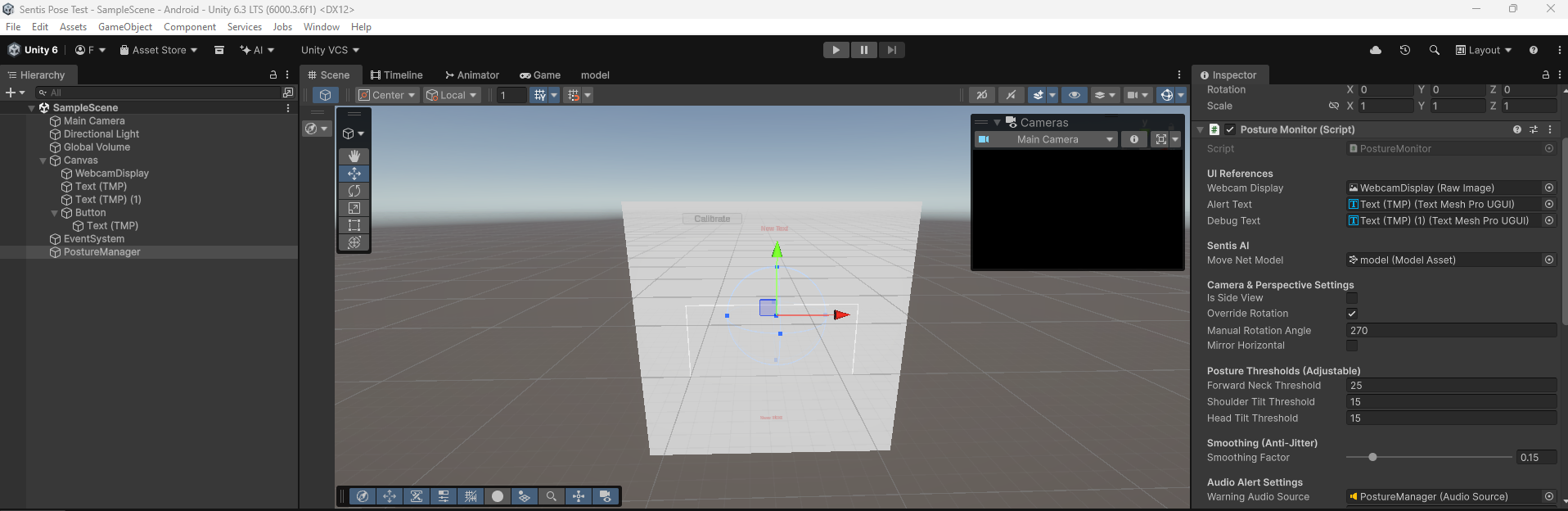
Codice sorgente
  1
  2
  3
  4
  5
  6
  7
  8
  9
 10
 11
 12
 13
 14
 15
 16
 17
 18
 19
 20
 21
 22
 23
 24
 25
 26
 27
 28
 29
 30
 31
 32
 33
 34
 35
 36
 37
 38
 39
 40
 41
 42
 43
 44
 45
 46
 47
 48
 49
 50
 51
 52
 53
 54
 55
 56
 57
 58
 59
 60
 61
 62
 63
 64
 65
 66
 67
 68
 69
 70
 71
 72
 73
 74
 75
 76
 77
 78
 79
 80
 81
 82
 83
 84
 85
 86
 87
 88
 89
 90
 91
 92
 93
 94
 95
 96
 97
 98
 99
100
101
102
103
104
105
106
107
108
109
110
111
112
113
114
115
116
117
118
119
120
121
122
123
124
125
126
127
128
129
130
131
132
133
134
135
136
137
138
139
140
141
142
143
144
145
146
147
148
149
150
151
152
153
154
155
156
157
158
159
160
161
162
163
164
165
166
167
168
169
170
171
172
173
174
175
176
177
178
179
180
181
182
183
184
185
186
187
188
189
190
191
192
193
194
195
196
197
198
199
200
201
202
203
204
205
206
207
208
209
210
211
212
213
214
215
216
217
218
219
220
221
222
223
224
225
226
227
228
229
230
231
232
233
234
235
236
237
238
239
240
241
242
243
244
245
246
247
248
249
250
251
252
253
254
255
256
257
258
259
260
261
262
263
264
265
266
267
268
269
270
271
272
273
274
275
276
277
278
279
280
281
282
283
284
285
286
287
288
289
290
291
292
293
294
295
296
297
298
299
300
301
302
303
304
305
306
307
308
309
310
311
312
313
314
315
316
317
318
319
320
321
322
323
324
325
326
327
328
329
330
331
332
333
334
335
336
337
338
339
340
341
342
343
344
345
346
347
348
349
350
351
352
353
354
355
356
357
358
359
360
361
362
363
364
365
366
367
368
369
370
371
372
373
374
375
376
| using UnityEngine;
using UnityEngine.UI;
using Unity.Mathematics;
using Unity.InferenceEngine;
using TMPro;
public class PostureMonitor : MonoBehaviour
{
[Header("UI References")]
public RawImage webcamDisplay;
public TextMeshProUGUI alertText;
public TextMeshProUGUI debugText;
[Header("Sentis AI")]
public ModelAsset moveNetModel;
private Worker worker;
private const int IMAGE_SIZE = 192;
[Header("Camera & Perspective Settings")]
public bool isSideView = false;
public bool overrideRotation = false;
public int manualRotationAngle = 90;
public bool mirrorHorizontal = false;
[Header("Posture Thresholds (Adjustable)")]
public float forwardNeckThreshold = 25f;
public float shoulderTiltThreshold = 15f;
public float headTiltThreshold = 15f;
[Header("Smoothing (Anti-Jitter)")]
[Range(0.01f, 1f)]
public float smoothingFactor = 0.15f;
[Header("Audio Alert Settings")]
public AudioSource warningAudioSource;
public int badFramesThreshold = 5;
private int consecutiveBadFrames = 0;
// --- CALIBRATION SYSTEM ---
private bool isCalibrated = false;
private float baselineShoulderAngle = 0f;
private float baselineHeadAngle = 0f;
private float baselineNeckAngle = 0f;
// --- SKELETON OVERLAY ---
private RectTransform[] jointRects = new RectTransform[5]; // Nose, L Ear, R Ear, L Shoulder, R Shoulder
private RectTransform[] boneRects = new RectTransform[4]; // Lines connecting them
// Memory for the smoothing filter
private float2 smoothedNose, smoothedLeftEar, smoothedRightEar, smoothedLeftShoulder, smoothedRightShoulder;
private bool isFirstFrame = true;
private WebCamTexture webcamTexture;
private Texture2D aiInputTexture;
private Color32[] rawCameraPixels;
private Color32[] squarePixels;
private float[] tensorData;
private bool isProcessingFrame = false;
void Start()
{
InitializeCamera();
InitializeSentis();
InitializeSkeletonUI();
}
private void InitializeCamera()
{
WebCamDevice[] devices = WebCamTexture.devices;
string backCamName = "";
for (int i = 0; i < devices.Length; i++)
{
if (!devices[i].isFrontFacing) { backCamName = devices[i].name; break; }
}
webcamTexture = new WebCamTexture(!string.IsNullOrEmpty(backCamName) ? backCamName : "");
webcamTexture.Play();
aiInputTexture = new Texture2D(IMAGE_SIZE, IMAGE_SIZE, TextureFormat.RGBA32, false);
squarePixels = new Color32[IMAGE_SIZE * IMAGE_SIZE];
tensorData = new float[1 * IMAGE_SIZE * IMAGE_SIZE * 3];
webcamDisplay.texture = aiInputTexture;
}
private void InitializeSentis()
{
Model runtimeModel = ModelLoader.Load(moveNetModel);
worker = new Worker(runtimeModel, BackendType.GPUPixel);
alertText.text = "Press 'Calibrate' to start!";
if (debugText != null) debugText.text = "Detect...";
}
private void InitializeSkeletonUI()
{
// Generate glowing dots for joints
for (int i = 0; i < jointRects.Length; i++)
{
GameObject joint = new GameObject($"Joint_{i}");
joint.transform.SetParent(webcamDisplay.transform, false);
Image img = joint.AddComponent<Image>();
img.color = Color.cyan;
jointRects[i] = joint.GetComponent<RectTransform>();
jointRects[i].sizeDelta = new Vector2(15, 15);
}
// Generate glowing lines for bones
for (int i = 0; i < boneRects.Length; i++)
{
GameObject bone = new GameObject($"Bone_{i}");
bone.transform.SetParent(webcamDisplay.transform, false);
Image img = bone.AddComponent<Image>();
img.color = new Color(0, 1, 1, 0.5f); // Semi-transparent cyan
boneRects[i] = bone.GetComponent<RectTransform>();
boneRects[i].pivot = new Vector2(0, 0.5f); // Set pivot to edge for stretching
}
}
// Link this to a UI Button
public void CalibratePosture()
{
// Lock in the current smoothed angles as perfect 0
if (isSideView)
{
float deltaX = math.abs(smoothedLeftEar.x - smoothedLeftShoulder.x); // Simplified logic
float deltaY = math.abs(smoothedLeftEar.y - smoothedLeftShoulder.y);
baselineNeckAngle = math.degrees(math.atan2(deltaX, deltaY));
}
else
{
float shoulderDeltaY = math.abs(smoothedRightShoulder.y - smoothedLeftShoulder.y);
float shoulderDeltaX = math.abs(smoothedRightShoulder.x - smoothedLeftShoulder.x);
baselineShoulderAngle = math.degrees(math.atan2(shoulderDeltaY, shoulderDeltaX));
float headDeltaY = math.abs(smoothedRightEar.y - smoothedLeftEar.y);
float headDeltaX = math.abs(smoothedRightEar.x - smoothedLeftEar.x);
baselineHeadAngle = math.degrees(math.atan2(headDeltaY, headDeltaX));
float2 shoulderMid = (smoothedLeftShoulder + smoothedRightShoulder) / 2f;
float2 earMid = (smoothedLeftEar + smoothedRightEar) / 2f;
baselineNeckAngle = math.degrees(math.atan2(math.abs(earMid.x - shoulderMid.x), math.abs(earMid.y - shoulderMid.y)));
}
isCalibrated = true;
alertText.text = "Calibrated! Monitoring...";
alertText.color = Color.green;
}
void Update()
{
if (!webcamTexture.isPlaying || !webcamTexture.didUpdateThisFrame || webcamTexture.width <= 16 || isProcessingFrame) return;
isProcessingFrame = true;
_ = ProcessFrameSafeAsync();
}
private async Awaitable ProcessFrameSafeAsync()
{
try { await ProcessFrameAsync(); }
catch (System.Exception e) { Debug.LogError($"PostureMonitor Error: {e.Message}"); isProcessingFrame = false; }
}
private async Awaitable ProcessFrameAsync()
{
// [Camera cropping logic remains identical to keep the square perfect...]
int camW = webcamTexture.width;
int camH = webcamTexture.height;
if (rawCameraPixels == null || rawCameraPixels.Length != camW * camH) rawCameraPixels = new Color32[camW * camH];
webcamTexture.GetPixels32(rawCameraPixels);
int minDim = math.min(camW, camH);
int offsetX = (camW - minDim) / 2;
int offsetY = (camH - minDim) / 2;
int rot = overrideRotation ? manualRotationAngle : webcamTexture.videoRotationAngle;
for (int y = 0; y < IMAGE_SIZE; y++)
{
for (int x = 0; x < IMAGE_SIZE; x++)
{
int mappedX = (x * minDim) / IMAGE_SIZE;
int mappedY = (y * minDim) / IMAGE_SIZE;
int srcX = mappedX, srcY = mappedY;
if (rot == 90) { srcX = mappedY; srcY = minDim - 1 - mappedX; }
else if (rot == 180) { srcX = minDim - 1 - mappedX; srcY = minDim - 1 - mappedY; }
else if (rot == 270) { srcX = minDim - 1 - mappedY; srcY = mappedX; }
if (mirrorHorizontal) srcX = minDim - 1 - srcX;
srcX = math.clamp(srcX + offsetX, 0, camW - 1);
srcY = math.clamp(srcY + offsetY, 0, camH - 1);
Color32 c = rawCameraPixels[srcY * camW + srcX];
squarePixels[y * IMAGE_SIZE + x] = c;
int aiY = IMAGE_SIZE - 1 - y;
int tensorIndex = (aiY * IMAGE_SIZE + x) * 3;
tensorData[tensorIndex + 0] = c.r;
tensorData[tensorIndex + 1] = c.g;
tensorData[tensorIndex + 2] = c.b;
}
}
aiInputTexture.SetPixels32(squarePixels);
aiInputTexture.Apply();
using Tensor<float> inputTensor = new Tensor<float>(new TensorShape(1, IMAGE_SIZE, IMAGE_SIZE, 3), tensorData);
worker.Schedule(inputTensor);
Tensor<float> outputTensor = worker.PeekOutput() as Tensor<float>;
using Tensor<float> cpuOutputTensor = await outputTensor.ReadbackAndCloneAsync() as Tensor<float>;
EvaluatePosture(cpuOutputTensor);
isProcessingFrame = false;
}
private void EvaluatePosture(Tensor<float> output)
{
var data = output.DownloadToArray();
float2 GetPoint(int index, out float confidence)
{
int offset = index * 3;
confidence = data[offset + 2];
return new float2(data[offset + 1], data[offset]);
}
float2 rawNose = GetPoint(0, out float noseConf);
float2 rawLeftEar = GetPoint(3, out float leConf);
float2 rawRightEar = GetPoint(4, out float reConf);
float2 rawLeftShoulder = GetPoint(5, out float lsConf);
float2 rawRightShoulder = GetPoint(6, out float rsConf);
float avgConf = (noseConf + leConf + reConf + lsConf + rsConf) / 5f;
if (avgConf < 0.2f)
{
if(!isCalibrated) alertText.text = "Searching for person...";
isFirstFrame = true;
consecutiveBadFrames = 0;
if (warningAudioSource != null && warningAudioSource.isPlaying) warningAudioSource.Stop();
SetSkeletonVisibility(false);
return;
}
if (isFirstFrame)
{
smoothedNose = rawNose; smoothedLeftEar = rawLeftEar; smoothedRightEar = rawRightEar;
smoothedLeftShoulder = rawLeftShoulder; smoothedRightShoulder = rawRightShoulder;
isFirstFrame = false;
}
else
{
smoothedNose = math.lerp(smoothedNose, rawNose, smoothingFactor);
smoothedLeftEar = math.lerp(smoothedLeftEar, rawLeftEar, smoothingFactor);
smoothedRightEar = math.lerp(smoothedRightEar, rawRightEar, smoothingFactor);
smoothedLeftShoulder = math.lerp(smoothedLeftShoulder, rawLeftShoulder, smoothingFactor);
smoothedRightShoulder = math.lerp(smoothedRightShoulder, rawRightShoulder, smoothingFactor);
}
// 1. UPDATE VISUAL SKELETON
SetSkeletonVisibility(true);
UpdateSkeletonVisuals();
// If not calibrated yet, stop math here.
if (!isCalibrated) return;
// 2. MATH EVALUATION (NOW USING CALIBRATED BASELINES)
bool isBadPosture = false;
if (isSideView)
{
float2 visibleEar = (leConf > reConf) ? smoothedLeftEar : smoothedRightEar;
float2 visibleShoulder = (lsConf > rsConf) ? smoothedLeftShoulder : smoothedRightShoulder;
float deltaX = math.abs(visibleEar.x - visibleShoulder.x);
float deltaY = math.abs(visibleEar.y - visibleShoulder.y);
float forwardNeckAngle = math.degrees(math.atan2(deltaX, deltaY));
// Subtract baseline to get true deviance
if (math.abs(forwardNeckAngle - baselineNeckAngle) > forwardNeckThreshold)
{
alertText.color = Color.red; alertText.text = "INCORRECT\n(Slouching / Tech Neck)";
isBadPosture = true;
}
}
else
{
float shoulderAngle = math.degrees(math.atan2(math.abs(smoothedRightShoulder.y - smoothedLeftShoulder.y), math.abs(smoothedRightShoulder.x - smoothedLeftShoulder.x)));
float headAngle = math.degrees(math.atan2(math.abs(smoothedRightEar.y - smoothedLeftEar.y), math.abs(smoothedRightEar.x - smoothedLeftEar.x)));
float2 shoulderMid = (smoothedLeftShoulder + smoothedRightShoulder) / 2f;
float2 earMid = (smoothedLeftEar + smoothedRightEar) / 2f;
float neckDeviation = math.degrees(math.atan2(math.abs(earMid.x - shoulderMid.x), math.abs(earMid.y - shoulderMid.y)));
// Math compares current angle against YOUR calibrated baseline!
bool isLeaning = math.abs(shoulderAngle - baselineShoulderAngle) > shoulderTiltThreshold;
bool isHeadTilted = math.abs(headAngle - baselineHeadAngle) > headTiltThreshold;
bool isTechNeck = math.abs(neckDeviation - baselineNeckAngle) > forwardNeckThreshold;
if (isLeaning || isHeadTilted || isTechNeck)
{
alertText.color = Color.red;
isBadPosture = true;
if (isTechNeck) alertText.text = "INCORRECT\n(Slouching / Tech Neck)";
else if (isLeaning) alertText.text = "INCORRECT\n(Leaning / Shoulders Uneven)";
else if (isHeadTilted) alertText.text = "INCORRECT\n(Head is tilted)";
}
}
if (isBadPosture)
{
consecutiveBadFrames++;
if (consecutiveBadFrames >= badFramesThreshold && warningAudioSource != null && !warningAudioSource.isPlaying)
warningAudioSource.Play();
}
else
{
alertText.color = Color.green; alertText.text = "CORRECT\n(Good Sitting Posture)";
consecutiveBadFrames = 0;
if (warningAudioSource != null && warningAudioSource.isPlaying) warningAudioSource.Stop();
}
}
// --- SKELETON MATH HELPERS ---
private void UpdateSkeletonVisuals()
{
float w = webcamDisplay.rectTransform.rect.width;
float h = webcamDisplay.rectTransform.rect.height;
// Map AI 0-1 points to UI space
Vector2 MapToUI(float2 point) {
return new Vector2((point.x - 0.5f) * w, -(point.y - 0.5f) * h);
}
Vector2 n = MapToUI(smoothedNose);
Vector2 le = MapToUI(smoothedLeftEar);
Vector2 re = MapToUI(smoothedRightEar);
Vector2 ls = MapToUI(smoothedLeftShoulder);
Vector2 rs = MapToUI(smoothedRightShoulder);
// Place Joints
jointRects[0].anchoredPosition = n;
jointRects[1].anchoredPosition = le;
jointRects[2].anchoredPosition = re;
jointRects[3].anchoredPosition = ls;
jointRects[4].anchoredPosition = rs;
// Draw Bones (Lines connecting joints)
DrawBone(boneRects[0], re, n); // Right Ear to Nose
DrawBone(boneRects[1], le, n); // Left Ear to Nose
DrawBone(boneRects[2], rs, ls); // Right Shoulder to Left Shoulder
DrawBone(boneRects[3], new Vector2((re.x + le.x)/2f, (re.y + le.y)/2f), new Vector2((rs.x + ls.x)/2f, (rs.y + ls.y)/2f)); // Neck line
}
private void DrawBone(RectTransform bone, Vector2 start, Vector2 end)
{
Vector2 dir = end - start;
float length = dir.magnitude;
float angle = Mathf.Atan2(dir.y, dir.x) * Mathf.Rad2Deg;
bone.anchoredPosition = start;
bone.sizeDelta = new Vector2(length, 4f); // 4f is the thickness of the line
bone.rotation = Quaternion.Euler(0, 0, angle);
}
private void SetSkeletonVisibility(bool isVisible)
{
foreach (var j in jointRects) j.gameObject.SetActive(isVisible);
foreach (var b in boneRects) b.gameObject.SetActive(isVisible);
}
void OnDestroy()
{
worker?.Dispose();
if (aiInputTexture != null) Destroy(aiInputTexture);
if (webcamTexture != null) webcamTexture.Stop();
}
}
|
Troubleshooting
1. Il Bug della Fotocamera Schiacciata
Le fotocamere mobile trasmettono flussi rettangolari (es. 16:9), ma MoveNet richiede un quadrato perfetto (1:1). Se forziamo Unity a scalare l’immagine, questa appare deformata, rendendo l’IA incapace di riconoscere le proporzioni umane.
Soluzione: Ho scritto un custom cropper su CPU che ritaglia l’area centrale del sensore mantenendo le proporzioni native prima di inviare i dati al Tensor(Vedi codice sopra).
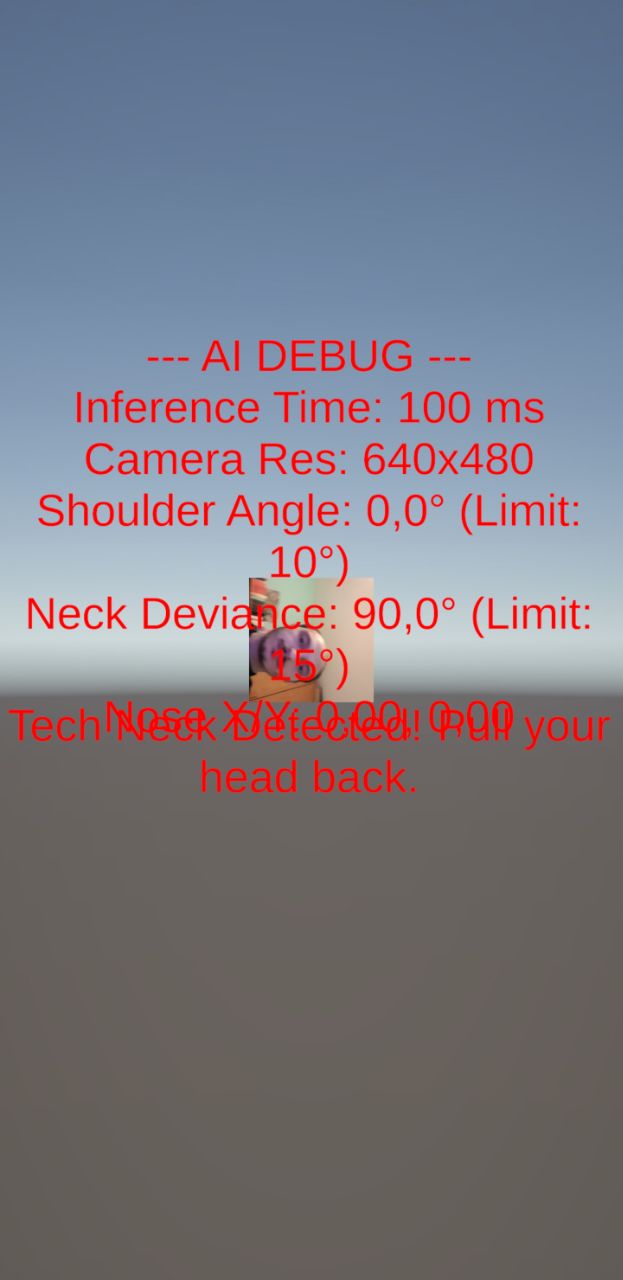
2. La Rotazione Hardware (Exynos Matrix)
Molti dispositivi Android memorizzano i dati dei pixel ruotati di 90° o 270°. Senza una correzione manuale, l’IA “vede” l’utente sdraiato di lato.
Soluzione: Implementazione di una matrice di rotazione manuale per raddrizzare i pixel grezzi in base all’orientamento del sensore.
3. Jitter e Falsi Positivi
I dati grezzi dell’IA sono sporchi e rumorosi: i punti delle spalle oscillano leggermente anche se siamo fermi.
Soluzione: Ho applicato un Filtro di Smoothing Esponenziale (Low-Pass filter) per stabilizzare le coordinate e un Buffer di Frame che attiva l’allarme solo dopo 5 rilevazioni consecutive di postura errata.
Conclusioni
Unity Sentis si conferma uno strumento potentissimo per portare l’IA nel mondo reale senza dipendere da API cloud costose. Tuttavia, lo sviluppo su Android richiede ancora una profonda conoscenza della gestione dei buffer video e delle pipeline grafiche.
Criticità riscontrate:
- Frammentazione Android: Driver diversi (Mali vs Adreno) possono causare crash sugli shader di Sentis.
- Luce: La precisione cala drasticamente in condizioni di scarsa illuminazione.
In conclusione, questo progetto dimostra come Unity Sentis sia un motore molto potente anche se probabilmente avremmo ottenuto risultati migliori usando una piattaforma specifica per la computer vision.
Video
Available soon…
Reference
Grazie :)
