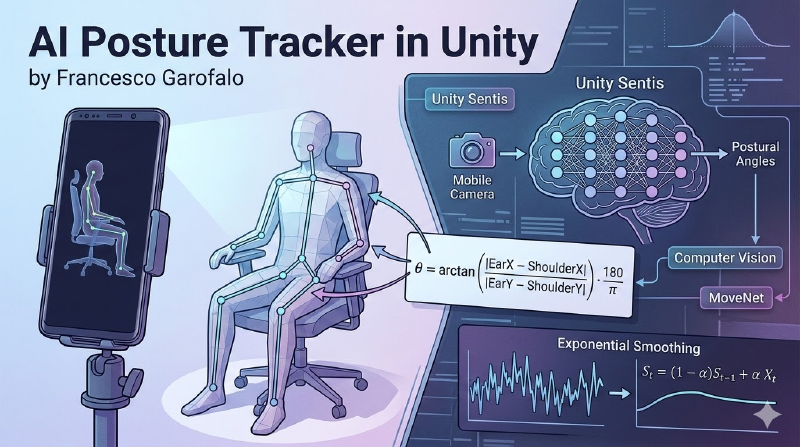
In this guide, I explore the potential of Unity Sentis to create a Computer Vision application capable of monitoring posture in real-time and providing corrections to the user.
Introduction
The goal of the project is simple: use a smartphone camera to track the human skeleton and trigger an audio alert when the user slumps too much.
The idea is to repurpose an old smartphone sitting in a drawer to perform posture tracking and analysis.
To achieve this, I used Unity Sentis, Unity’s neural inference engine that allows AI models to run locally on the device (Edge AI with minimal latency).
The tech stack is based on:
- AI Model: MoveNet SinglePose Lightning (Google).
- Input: 192x192 pixel RGB images.
- Output: 17 Keypoints of the human body.
Developing for Android, especially on older devices like a Samsung S9 (Exynos), revealed unexpected hardware criticalities that Unity and AR Foundation often don’t handle automatically.
Demo and Functionality
The application doesn’t just track points; it interprets the data to make it useful for the end user.
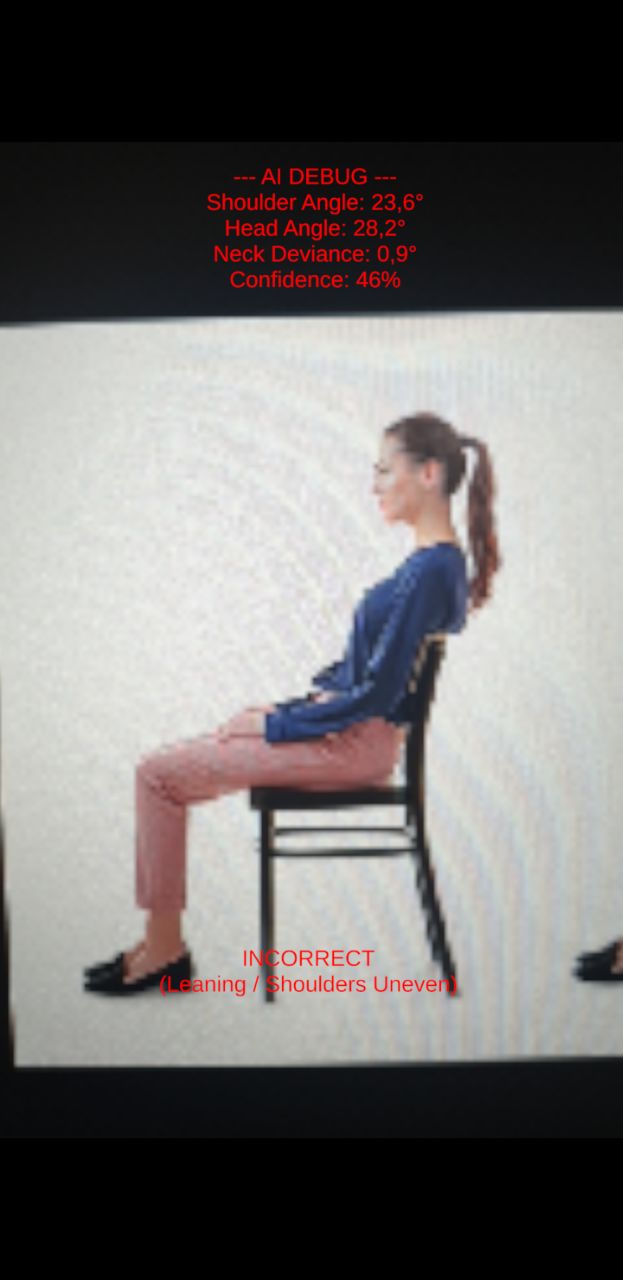
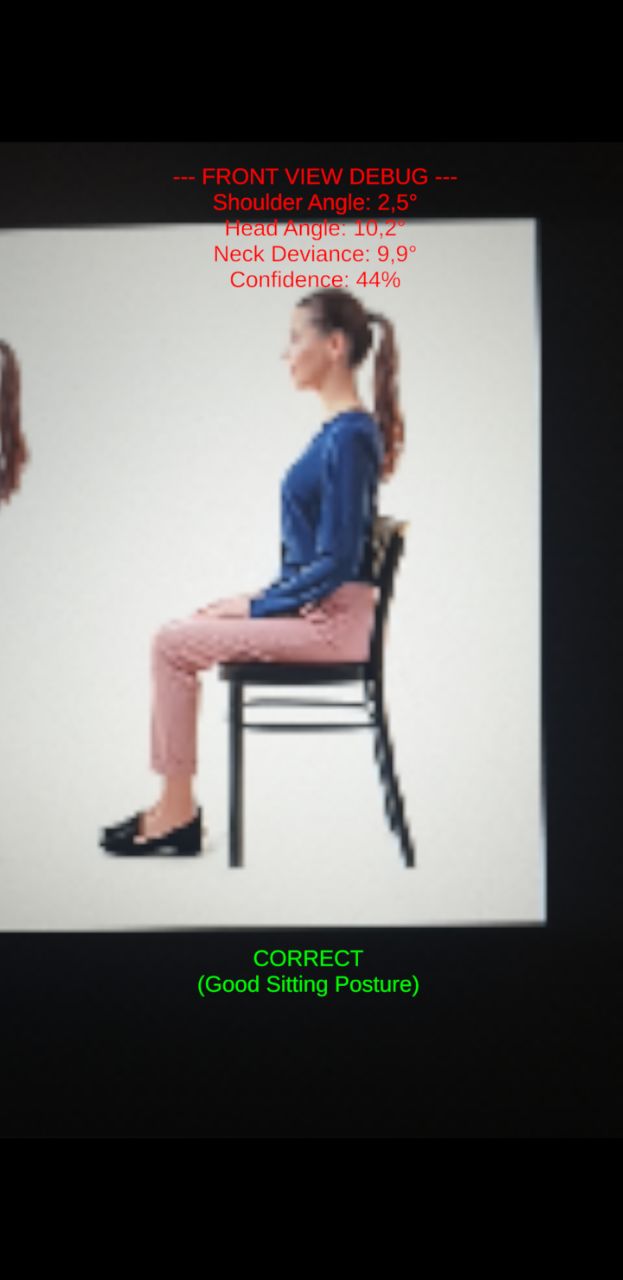
In the initial version, the app provided debug data and evaluated whether the posture was correct. However, this mechanism often led to false positives, triggering warnings even when the posture was fine.
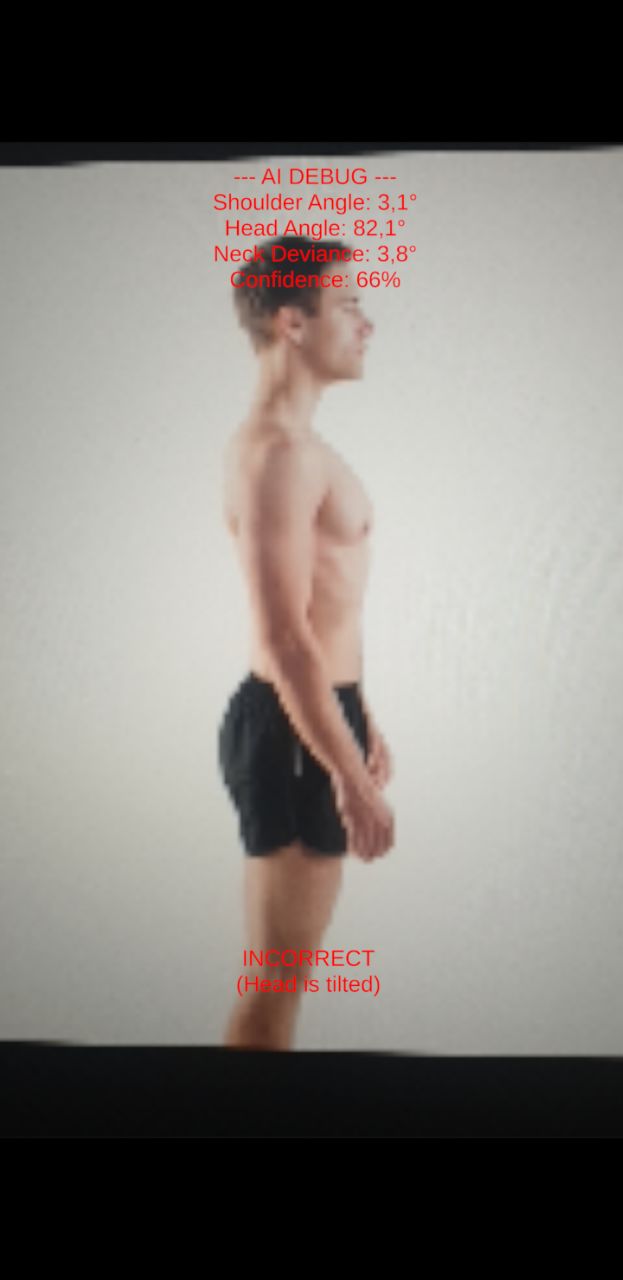
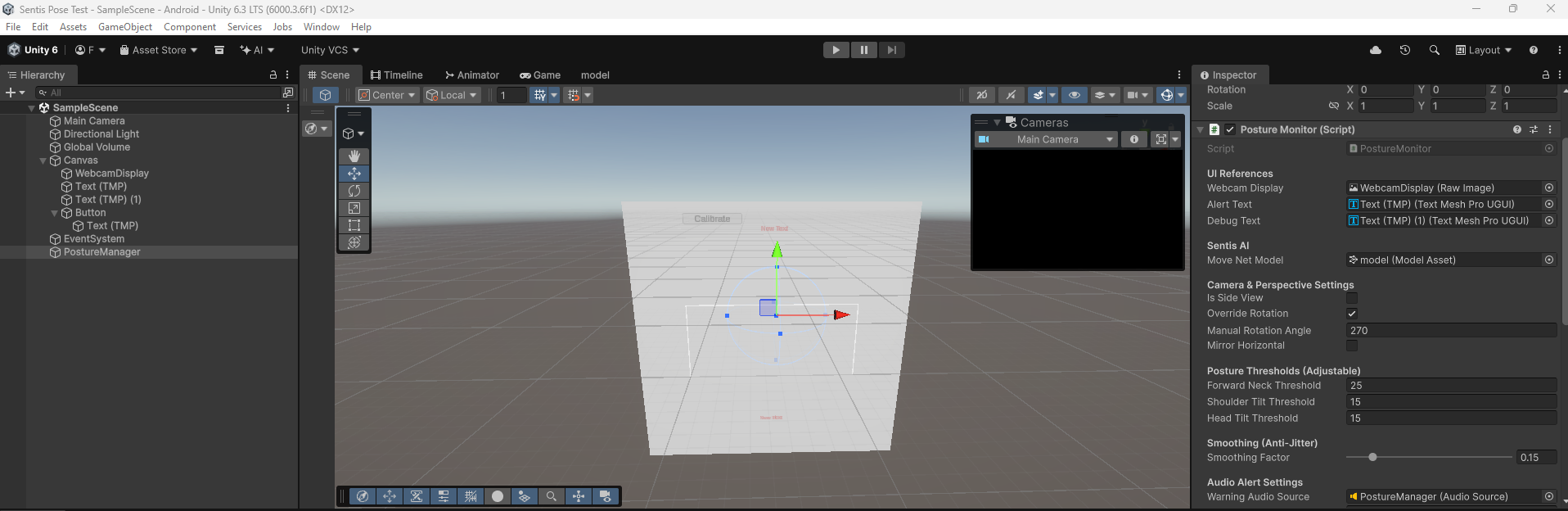
To solve this, a calibration button was added.
Personalized Calibration
Since every body is different, I added a calibration system. The user presses a button while sitting in their “correct” position; the app saves those angles as the reference “Zero,” adapting to users who might, for example, have one shoulder naturally higher than the other.
Eliminating Jitter with Exponential Smoothing
Raw AI data is inherently noisy. Even if the user sits perfectly still, the predicted coordinates might jump by 5–10 pixels per frame. This causes the calculated posture angles to swing wildly. To fix this, I implemented an Exponential Smoothing Filter (a form of Low-Pass filter).
Instead of trusting the raw AI data Xt directly, the app calculates a smoothed position St by blending it with the previous frame’s position St−1 using a smoothing factor α (e.g., 0.15):
St=(1−α)St−1+αXt
This acts as a digital shock absorber, yielding rock-solid angles that only update during genuine physical movement.
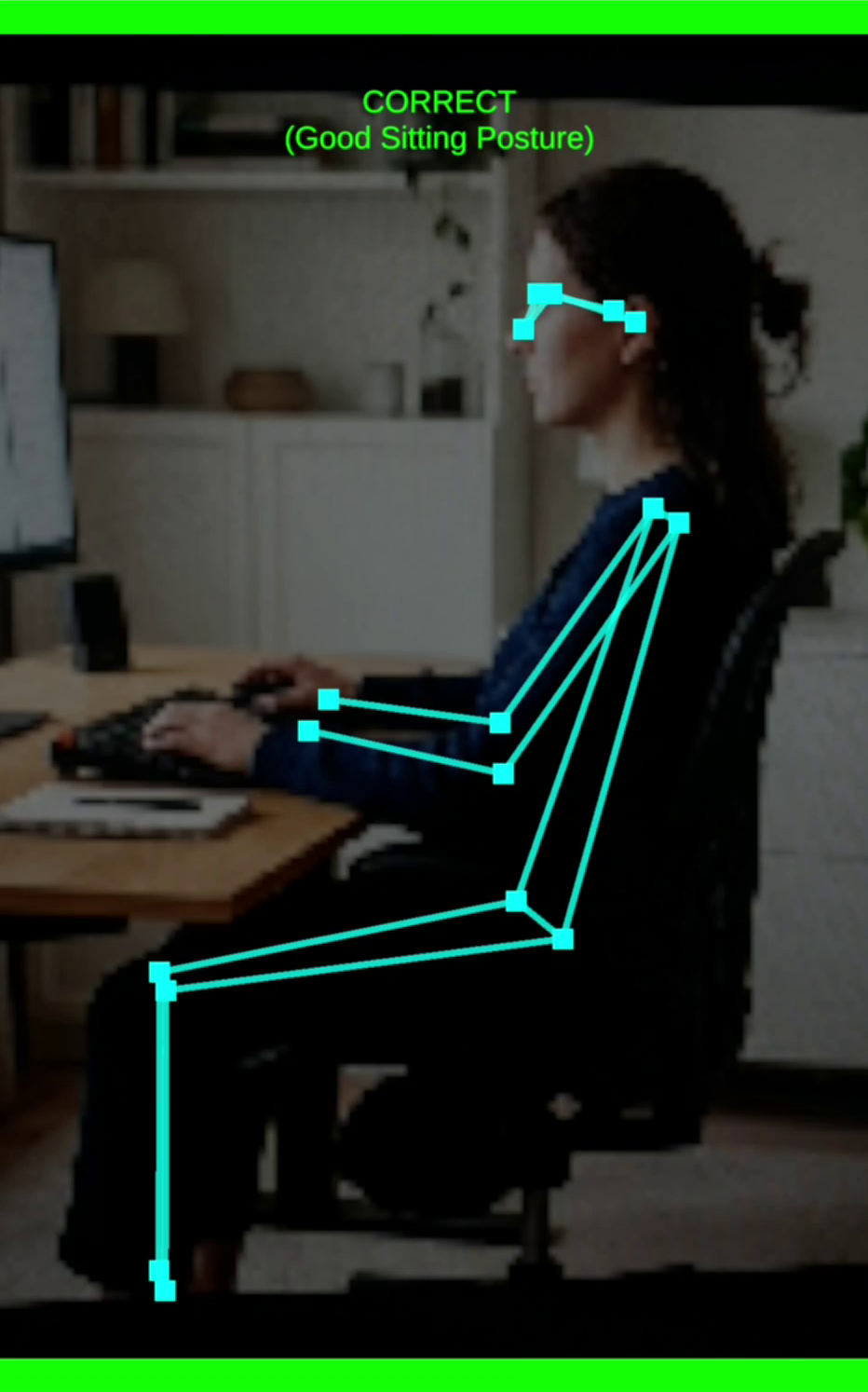
Skeleton UI Visualization (Without LineRenderer)
For visual feedback, I needed to draw the tracked skeleton over the camera feed. The standard Unity approach is using a LineRenderer. However, LineRenderer operates in 3D world space, which causes massive depth-sorting and scaling issues when overlaying a 2D Screen Space UI Canvas.
Instead, I developed a custom algorithm using standard 2D Image components and RectTransform. By setting the pivot of an image to its edge (0, 0.5), we can mathematically stretch and rotate it to connect any two joints:
Length: Calculate the magnitude of the vector between the two joints to set the sizeDelta.x.
Rotation: Use Mathf.Atan2 to calculate the angle between the joints and apply it via Quaternion.Euler.
The Mathematics of Posture
To determine if a user is slouching, the app uses standard trigonometry to calculate the deviation of specific body parts from a perfectly vertical or horizontal axis.
To ensure the math works flawlessly regardless of whether the user is facing the front camera (mirrored) or the rear camera (un-mirrored), we calculate the angle using the absolute difference between the X and Y coordinates.
For example, to calculate the Forward Neck Angle (Tech Neck) from a side profile, we find the visible ear and the visible shoulder. The angle θ relative to a perfectly vertical spine is calculated as:
θ=arctan(∣Eary−Shouldery∣∣Earx−Shoulderx∣)×π180
If θ exceeds the user’s calibrated baseline by a specific threshold (e.g., 25∘), the app flags the posture as incorrect.
Skeleton UI Visualization
For visual feedback, instead of using the resource-heavy 3D LineRenderer, I developed an algorithm using 2D RectTransform. This allows the glowing skeleton to be drawn directly over the UI, ensuring high performance even on mid-range phones.
Project and Code
The Model
The trained model I imported into Unity is MoveNet SinglePose Lightning in ONNX format, available at this Hugging Face link.
I recommend downloading the basic, non-quantized model.
Hierarchy / Scene
Source Code
  1
  2
  3
  4
  5
  6
  7
  8
  9
 10
 11
 12
 13
 14
 15
 16
 17
 18
 19
 20
 21
 22
 23
 24
 25
 26
 27
 28
 29
 30
 31
 32
 33
 34
 35
 36
 37
 38
 39
 40
 41
 42
 43
 44
 45
 46
 47
 48
 49
 50
 51
 52
 53
 54
 55
 56
 57
 58
 59
 60
 61
 62
 63
 64
 65
 66
 67
 68
 69
 70
 71
 72
 73
 74
 75
 76
 77
 78
 79
 80
 81
 82
 83
 84
 85
 86
 87
 88
 89
 90
 91
 92
 93
 94
 95
 96
 97
 98
 99
100
101
102
103
104
105
106
107
108
109
110
111
112
113
114
115
116
117
118
119
120
121
122
123
124
125
126
127
128
129
130
131
132
133
134
135
136
137
138
139
140
141
142
143
144
145
146
147
148
149
150
151
152
153
154
155
156
157
158
159
160
161
162
163
164
165
166
167
168
169
170
171
172
173
174
175
176
177
178
179
180
181
182
183
184
185
186
187
188
189
190
191
192
193
194
195
196
197
198
199
200
201
202
203
204
205
206
207
208
209
210
211
212
213
214
215
216
217
218
219
220
221
222
223
224
225
226
227
228
229
230
231
232
233
234
235
236
237
238
239
240
241
242
243
244
245
246
247
248
249
250
251
252
253
254
255
256
257
258
259
260
261
262
263
264
265
266
267
268
269
270
271
272
273
274
275
276
277
278
279
280
281
282
283
284
285
286
287
288
289
290
291
292
293
294
295
296
297
298
299
300
301
302
303
304
305
306
307
308
309
310
311
312
313
314
315
316
317
318
319
320
321
322
323
324
325
326
327
328
329
330
331
332
333
334
335
336
337
338
339
340
341
342
343
344
345
346
347
348
349
350
351
352
353
354
355
356
357
358
359
360
361
362
363
364
365
366
367
368
369
370
371
372
373
374
375
376
| using UnityEngine;
using UnityEngine.UI;
using Unity.Mathematics;
using Unity.InferenceEngine;
using TMPro;
public class PostureMonitor : MonoBehaviour
{
[Header("UI References")]
public RawImage webcamDisplay;
public TextMeshProUGUI alertText;
public TextMeshProUGUI debugText;
[Header("Sentis AI")]
public ModelAsset moveNetModel;
private Worker worker;
private const int IMAGE_SIZE = 192;
[Header("Camera & Perspective Settings")]
public bool isSideView = false;
public bool overrideRotation = false;
public int manualRotationAngle = 90;
public bool mirrorHorizontal = false;
[Header("Posture Thresholds (Adjustable)")]
public float forwardNeckThreshold = 25f;
public float shoulderTiltThreshold = 15f;
public float headTiltThreshold = 15f;
[Header("Smoothing (Anti-Jitter)")]
[Range(0.01f, 1f)]
public float smoothingFactor = 0.15f;
[Header("Audio Alert Settings")]
public AudioSource warningAudioSource;
public int badFramesThreshold = 5;
private int consecutiveBadFrames = 0;
// --- CALIBRATION SYSTEM ---
private bool isCalibrated = false;
private float baselineShoulderAngle = 0f;
private float baselineHeadAngle = 0f;
private float baselineNeckAngle = 0f;
// --- SKELETON OVERLAY ---
private RectTransform[] jointRects = new RectTransform[5]; // Nose, L Ear, R Ear, L Shoulder, R Shoulder
private RectTransform[] boneRects = new RectTransform[4]; // Lines connecting them
// Memory for the smoothing filter
private float2 smoothedNose, smoothedLeftEar, smoothedRightEar, smoothedLeftShoulder, smoothedRightShoulder;
private bool isFirstFrame = true;
private WebCamTexture webcamTexture;
private Texture2D aiInputTexture;
private Color32[] rawCameraPixels;
private Color32[] squarePixels;
private float[] tensorData;
private bool isProcessingFrame = false;
void Start()
{
InitializeCamera();
InitializeSentis();
InitializeSkeletonUI();
}
private void InitializeCamera()
{
WebCamDevice[] devices = WebCamTexture.devices;
string backCamName = "";
for (int i = 0; i < devices.Length; i++)
{
if (!devices[i].isFrontFacing) { backCamName = devices[i].name; break; }
}
webcamTexture = new WebCamTexture(!string.IsNullOrEmpty(backCamName) ? backCamName : "");
webcamTexture.Play();
aiInputTexture = new Texture2D(IMAGE_SIZE, IMAGE_SIZE, TextureFormat.RGBA32, false);
squarePixels = new Color32[IMAGE_SIZE * IMAGE_SIZE];
tensorData = new float[1 * IMAGE_SIZE * IMAGE_SIZE * 3];
webcamDisplay.texture = aiInputTexture;
}
private void InitializeSentis()
{
Model runtimeModel = ModelLoader.Load(moveNetModel);
worker = new Worker(runtimeModel, BackendType.GPUPixel);
alertText.text = "Press 'Calibrate' to start!";
if (debugText != null) debugText.text = "Detect...";
}
private void InitializeSkeletonUI()
{
// Generate glowing dots for joints
for (int i = 0; i < jointRects.Length; i++)
{
GameObject joint = new GameObject($"Joint_{i}");
joint.transform.SetParent(webcamDisplay.transform, false);
Image img = joint.AddComponent<Image>();
img.color = Color.cyan;
jointRects[i] = joint.GetComponent<RectTransform>();
jointRects[i].sizeDelta = new Vector2(15, 15);
}
// Generate glowing lines for bones
for (int i = 0; i < boneRects.Length; i++)
{
GameObject bone = new GameObject($"Bone_{i}");
bone.transform.SetParent(webcamDisplay.transform, false);
Image img = bone.AddComponent<Image>();
img.color = new Color(0, 1, 1, 0.5f); // Semi-transparent cyan
boneRects[i] = bone.GetComponent<RectTransform>();
boneRects[i].pivot = new Vector2(0, 0.5f); // Set pivot to edge for stretching
}
}
// Link this to a UI Button
public void CalibratePosture()
{
// Lock in the current smoothed angles as perfect 0
if (isSideView)
{
float deltaX = math.abs(smoothedLeftEar.x - smoothedLeftShoulder.x); // Simplified logic
float deltaY = math.abs(smoothedLeftEar.y - smoothedLeftShoulder.y);
baselineNeckAngle = math.degrees(math.atan2(deltaX, deltaY));
}
else
{
float shoulderDeltaY = math.abs(smoothedRightShoulder.y - smoothedLeftShoulder.y);
float shoulderDeltaX = math.abs(smoothedRightShoulder.x - smoothedLeftShoulder.x);
baselineShoulderAngle = math.degrees(math.atan2(shoulderDeltaY, shoulderDeltaX));
float headDeltaY = math.abs(smoothedRightEar.y - smoothedLeftEar.y);
float headDeltaX = math.abs(smoothedRightEar.x - smoothedLeftEar.x);
baselineHeadAngle = math.degrees(math.atan2(headDeltaY, headDeltaX));
float2 shoulderMid = (smoothedLeftShoulder + smoothedRightShoulder) / 2f;
float2 earMid = (smoothedLeftEar + smoothedRightEar) / 2f;
baselineNeckAngle = math.degrees(math.atan2(math.abs(earMid.x - shoulderMid.x), math.abs(earMid.y - shoulderMid.y)));
}
isCalibrated = true;
alertText.text = "Calibrated! Monitoring...";
alertText.color = Color.green;
}
void Update()
{
if (!webcamTexture.isPlaying || !webcamTexture.didUpdateThisFrame || webcamTexture.width <= 16 || isProcessingFrame) return;
isProcessingFrame = true;
_ = ProcessFrameSafeAsync();
}
private async Awaitable ProcessFrameSafeAsync()
{
try { await ProcessFrameAsync(); }
catch (System.Exception e) { Debug.LogError($"PostureMonitor Error: {e.Message}"); isProcessingFrame = false; }
}
private async Awaitable ProcessFrameAsync()
{
// [Camera cropping logic remains identical to keep the square perfect...]
int camW = webcamTexture.width;
int camH = webcamTexture.height;
if (rawCameraPixels == null || rawCameraPixels.Length != camW * camH) rawCameraPixels = new Color32[camW * camH];
webcamTexture.GetPixels32(rawCameraPixels);
int minDim = math.min(camW, camH);
int offsetX = (camW - minDim) / 2;
int offsetY = (camH - minDim) / 2;
int rot = overrideRotation ? manualRotationAngle : webcamTexture.videoRotationAngle;
for (int y = 0; y < IMAGE_SIZE; y++)
{
for (int x = 0; x < IMAGE_SIZE; x++)
{
int mappedX = (x * minDim) / IMAGE_SIZE;
int mappedY = (y * minDim) / IMAGE_SIZE;
int srcX = mappedX, srcY = mappedY;
if (rot == 90) { srcX = mappedY; srcY = minDim - 1 - mappedX; }
else if (rot == 180) { srcX = minDim - 1 - mappedX; srcY = minDim - 1 - mappedY; }
else if (rot == 270) { srcX = minDim - 1 - mappedY; srcY = mappedX; }
if (mirrorHorizontal) srcX = minDim - 1 - srcX;
srcX = math.clamp(srcX + offsetX, 0, camW - 1);
srcY = math.clamp(srcY + offsetY, 0, camH - 1);
Color32 c = rawCameraPixels[srcY * camW + srcX];
squarePixels[y * IMAGE_SIZE + x] = c;
int aiY = IMAGE_SIZE - 1 - y;
int tensorIndex = (aiY * IMAGE_SIZE + x) * 3;
tensorData[tensorIndex + 0] = c.r;
tensorData[tensorIndex + 1] = c.g;
tensorData[tensorIndex + 2] = c.b;
}
}
aiInputTexture.SetPixels32(squarePixels);
aiInputTexture.Apply();
using Tensor<float> inputTensor = new Tensor<float>(new TensorShape(1, IMAGE_SIZE, IMAGE_SIZE, 3), tensorData);
worker.Schedule(inputTensor);
Tensor<float> outputTensor = worker.PeekOutput() as Tensor<float>;
using Tensor<float> cpuOutputTensor = await outputTensor.ReadbackAndCloneAsync() as Tensor<float>;
EvaluatePosture(cpuOutputTensor);
isProcessingFrame = false;
}
private void EvaluatePosture(Tensor<float> output)
{
var data = output.DownloadToArray();
float2 GetPoint(int index, out float confidence)
{
int offset = index * 3;
confidence = data[offset + 2];
return new float2(data[offset + 1], data[offset]);
}
float2 rawNose = GetPoint(0, out float noseConf);
float2 rawLeftEar = GetPoint(3, out float leConf);
float2 rawRightEar = GetPoint(4, out float reConf);
float2 rawLeftShoulder = GetPoint(5, out float lsConf);
float2 rawRightShoulder = GetPoint(6, out float rsConf);
float avgConf = (noseConf + leConf + reConf + lsConf + rsConf) / 5f;
if (avgConf < 0.2f)
{
if(!isCalibrated) alertText.text = "Searching for person...";
isFirstFrame = true;
consecutiveBadFrames = 0;
if (warningAudioSource != null && warningAudioSource.isPlaying) warningAudioSource.Stop();
SetSkeletonVisibility(false);
return;
}
if (isFirstFrame)
{
smoothedNose = rawNose; smoothedLeftEar = rawLeftEar; smoothedRightEar = rawRightEar;
smoothedLeftShoulder = rawLeftShoulder; smoothedRightShoulder = rawRightShoulder;
isFirstFrame = false;
}
else
{
smoothedNose = math.lerp(smoothedNose, rawNose, smoothingFactor);
smoothedLeftEar = math.lerp(smoothedLeftEar, rawLeftEar, smoothingFactor);
smoothedRightEar = math.lerp(smoothedRightEar, rawRightEar, smoothingFactor);
smoothedLeftShoulder = math.lerp(smoothedLeftShoulder, rawLeftShoulder, smoothingFactor);
smoothedRightShoulder = math.lerp(smoothedRightShoulder, rawRightShoulder, smoothingFactor);
}
// 1. UPDATE VISUAL SKELETON
SetSkeletonVisibility(true);
UpdateSkeletonVisuals();
// If not calibrated yet, stop math here.
if (!isCalibrated) return;
// 2. MATH EVALUATION (NOW USING CALIBRATED BASELINES)
bool isBadPosture = false;
if (isSideView)
{
float2 visibleEar = (leConf > reConf) ? smoothedLeftEar : smoothedRightEar;
float2 visibleShoulder = (lsConf > rsConf) ? smoothedLeftShoulder : smoothedRightShoulder;
float deltaX = math.abs(visibleEar.x - visibleShoulder.x);
float deltaY = math.abs(visibleEar.y - visibleShoulder.y);
float forwardNeckAngle = math.degrees(math.atan2(deltaX, deltaY));
// Subtract baseline to get true deviance
if (math.abs(forwardNeckAngle - baselineNeckAngle) > forwardNeckThreshold)
{
alertText.color = Color.red; alertText.text = "INCORRECT\n(Slouching / Tech Neck)";
isBadPosture = true;
}
}
else
{
float shoulderAngle = math.degrees(math.atan2(math.abs(smoothedRightShoulder.y - smoothedLeftShoulder.y), math.abs(smoothedRightShoulder.x - smoothedLeftShoulder.x)));
float headAngle = math.degrees(math.atan2(math.abs(smoothedRightEar.y - smoothedLeftEar.y), math.abs(smoothedRightEar.x - smoothedLeftEar.x)));
float2 shoulderMid = (smoothedLeftShoulder + smoothedRightShoulder) / 2f;
float2 earMid = (smoothedLeftEar + smoothedRightEar) / 2f;
float neckDeviation = math.degrees(math.atan2(math.abs(earMid.x - shoulderMid.x), math.abs(earMid.y - shoulderMid.y)));
// Math compares current angle against YOUR calibrated baseline!
bool isLeaning = math.abs(shoulderAngle - baselineShoulderAngle) > shoulderTiltThreshold;
bool isHeadTilted = math.abs(headAngle - baselineHeadAngle) > headTiltThreshold;
bool isTechNeck = math.abs(neckDeviation - baselineNeckAngle) > forwardNeckThreshold;
if (isLeaning || isHeadTilted || isTechNeck)
{
alertText.color = Color.red;
isBadPosture = true;
if (isTechNeck) alertText.text = "INCORRECT\n(Slouching / Tech Neck)";
else if (isLeaning) alertText.text = "INCORRECT\n(Leaning / Shoulders Uneven)";
else if (isHeadTilted) alertText.text = "INCORRECT\n(Head is tilted)";
}
}
if (isBadPosture)
{
consecutiveBadFrames++;
if (consecutiveBadFrames >= badFramesThreshold && warningAudioSource != null && !warningAudioSource.isPlaying)
warningAudioSource.Play();
}
else
{
alertText.color = Color.green; alertText.text = "CORRECT\n(Good Sitting Posture)";
consecutiveBadFrames = 0;
if (warningAudioSource != null && warningAudioSource.isPlaying) warningAudioSource.Stop();
}
}
// --- SKELETON MATH HELPERS ---
private void UpdateSkeletonVisuals()
{
float w = webcamDisplay.rectTransform.rect.width;
float h = webcamDisplay.rectTransform.rect.height;
// Map AI 0-1 points to UI space
Vector2 MapToUI(float2 point) {
return new Vector2((point.x - 0.5f) * w, -(point.y - 0.5f) * h);
}
Vector2 n = MapToUI(smoothedNose);
Vector2 le = MapToUI(smoothedLeftEar);
Vector2 re = MapToUI(smoothedRightEar);
Vector2 ls = MapToUI(smoothedLeftShoulder);
Vector2 rs = MapToUI(smoothedRightShoulder);
// Place Joints
jointRects[0].anchoredPosition = n;
jointRects[1].anchoredPosition = le;
jointRects[2].anchoredPosition = re;
jointRects[3].anchoredPosition = ls;
jointRects[4].anchoredPosition = rs;
// Draw Bones (Lines connecting joints)
DrawBone(boneRects[0], re, n); // Right Ear to Nose
DrawBone(boneRects[1], le, n); // Left Ear to Nose
DrawBone(boneRects[2], rs, ls); // Right Shoulder to Left Shoulder
DrawBone(boneRects[3], new Vector2((re.x + le.x)/2f, (re.y + le.y)/2f), new Vector2((rs.x + ls.x)/2f, (rs.y + ls.y)/2f)); // Neck line
}
private void DrawBone(RectTransform bone, Vector2 start, Vector2 end)
{
Vector2 dir = end - start;
float length = dir.magnitude;
float angle = Mathf.Atan2(dir.y, dir.x) * Mathf.Rad2Deg;
bone.anchoredPosition = start;
bone.sizeDelta = new Vector2(length, 4f); // 4f is the thickness of the line
bone.rotation = Quaternion.Euler(0, 0, angle);
}
private void SetSkeletonVisibility(bool isVisible)
{
foreach (var j in jointRects) j.gameObject.SetActive(isVisible);
foreach (var b in boneRects) b.gameObject.SetActive(isVisible);
}
void OnDestroy()
{
worker?.Dispose();
if (aiInputTexture != null) Destroy(aiInputTexture);
if (webcamTexture != null) webcamTexture.Stop();
}
}
|
Troubleshooting
1. The Squashed Camera Bug
Mobile cameras stream rectangular feeds (e.g., 16:9), but MoveNet requires a perfect square (1:1). If we force Unity to scale the image, it appears distorted, making the AI unable to recognize human proportions.
Solution: I wrote a custom CPU cropper that crops the central area of the sensor while maintaining native proportions before sending the data to the Tensor.
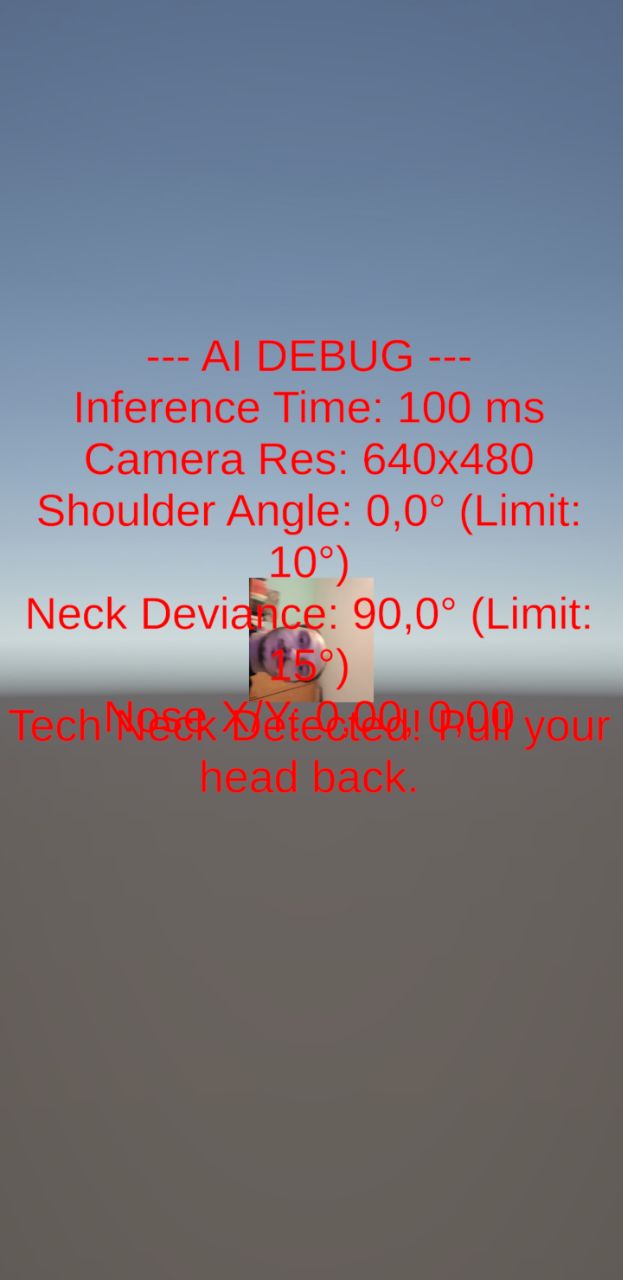
2. Hardware Rotation (The Exynos Matrix)
Many Android devices store pixel data rotated by 90° or 270°. Without manual correction, the AI “sees” the user lying on their side.
Solution: Implementation of a manual rotation matrix to straighten the raw pixels based on the sensor’s orientation.
3. Jitter and False Positives
Raw AI data is noisy: shoulder points fluctuate slightly even when standing still.
Solution: I applied an Exponential Smoothing Filter (Low-Pass filter) to stabilize coordinates and a Frame Buffer that only activates the alarm after 5 consecutive detections of bad posture.
Conclusions
Unity Sentis proves to be a powerful tool for bringing AI into the real world without depending on expensive cloud APIs. However, Android development still requires a deep understanding of video buffer management and graphics pipelines.
Key Issues Found:
- Android Fragmentation: Different drivers (Mali vs. Adreno) can cause crashes on Sentis shaders.
- Lighting: Accuracy drops drastically in low-light conditions.
In conclusion, this project demonstrates that Unity Sentis is a very capable engine, even though we might have achieved better results using a platform specifically dedicated to computer vision.
Video
Available soon…
References
Thank you! :)